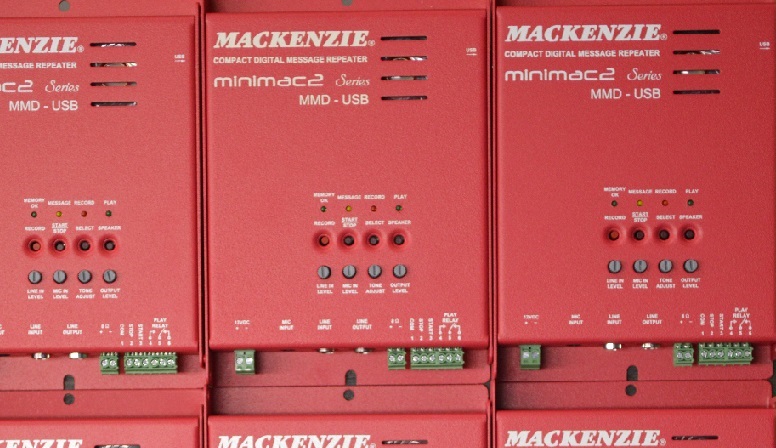
Minimac 2 · Compact audio message repeater
A tiny, but very mighty, Audio Recorder/Playback system. Built in Amplifier, Status Relay, Local and Remote capabilities!
The MiniMac2 offers hours of audio storage with excellent audio quality. The system allows for the recording of up to four messages, with any of them being enabled for repetitive playback, or all messages can be played in sequential mode. Audio messages can be recorded locally using the integrated microphone or line input, but can also be recorded in a studio and downloaded over the high speed USB port.
Overview
Key features
- On board recording capability
- Up to 15 kHz bandwidth
- Crystal clear 16 bit MP3 audio quality
- Digital transfer via USB memory key
- Record via line level or microphone inputs
- Line level output
- Speaker output (4 watts, 10 watt option)
- Playing relay (Form C)
- Multi-message (4) sequencing capability
- Over 16 hours of audio storage capacity
- Non-volatile SD card memory
- Compact size, just 6.5″ L × 4.5″ W × 1.25″ H
- Rugged enclosure
Applications
- Safety instructions for family entertainment center rides
- Voice for a theme park character’s costume, under battery power
- Nature trail information under solar power
- Warning messages in public areas (schools, work yards, etc.) for tornado, earthquake, etc.
- Sightseeing tour commentary
Specifications
| Audio | |
|---|---|
| File formats | WAV, MP3 |
| Bandwidth | 15 kHz |
| Output | Adjustable dual output, 8 Ω / 600 Ω; built-in amplifier |
| Monitor | Integrated speaker |
| Audio coding | Recording WAV, 44.1 kHz, mono; playback MP3 (VBR) or WAV, 44.1 kHz, 16 bit |
| Signal to noise | 80 dB typical; dynamic range 80 dB typical |
| Distortion (THD) | < 0.5% at 1 kHz, typical |
| Audio inputs | Line 10 kΩ, RCA; microphone 1.5 kΩ, 1/8″ mini jack; level potentiometers |
| Power output | 2.5 W into 8 Ω (MMD-USB); 10 W (MMD-USB/10W) |
| Tone control | Bass and treble, ±10 dB |
| Messages and storage | |
| Storage | Over 16 hours of audio |
| Messages | Up to 4; any one repeated, or all in sequence |
| Recording | On board: integrated microphone or line input |
| Transfer | USB memory key |
| Memory | Internal 1 GB SD card, non-volatile: 16+ hours MP3, 1.5+ hours WAV |
| Control | |
| Manual controls | Record setup, start/stop, select, speaker enable |
| Status | Status relay |
| Operation | Local and remote control |
| Start inputs | Remote start and stop (6 pin pluggable terminal) |
| Relays | Playing relay, dry contact Form C, 1 A at 24 VDC non-inductive load |
| Display | LEDs: Memory OK, Message, Record, Play |
| Physical | |
| Dimensions | 6.5″ W × 1.2″ H × 4.5″ D |
| Power | 12 VDC, 1 A with amplifier, 250 mA line out only; 15 VDC for the 10 W model |
| Mounting | Wall or table; optional 1U rack adapter; 18 gauge cold rolled steel, 2 lbs |
| Models | |
| MMD-USB | Minimac2, 4 messages, over 16 hours, 12 VDC |
| MMD-USB/10W | Minimac2 with 10 W amplifier, 15 VDC |
User manual in brief
Installation
The Minimac2 (model MMD-USB) is a compact digital audio message repeater in an 18 gauge cold rolled steel chassis, 6.5″ wide × 4.5″ deep × 1.2″ high, 2 lbs. It mounts on a wall or a table, with a rack mount option. With no moving parts, it suits automatic unattended operation, also in harsh environmental or mobile conditions.
- Find a space on the wall or table; for table top use, fit the included rubber feet. Leave about 6 inches in front of and above the unit for access to the controls and wiring.
- Mount the unit with its wiring at least 18″ away from the power supply or other equipment that generates electrical noise.
- Connect the audio inputs and outputs, then the control inputs and outputs.
- With the optional power supply, make sure a standard, non-switched electrical outlet is available.
- Connect and apply power, then test the unit’s operation.
Connections
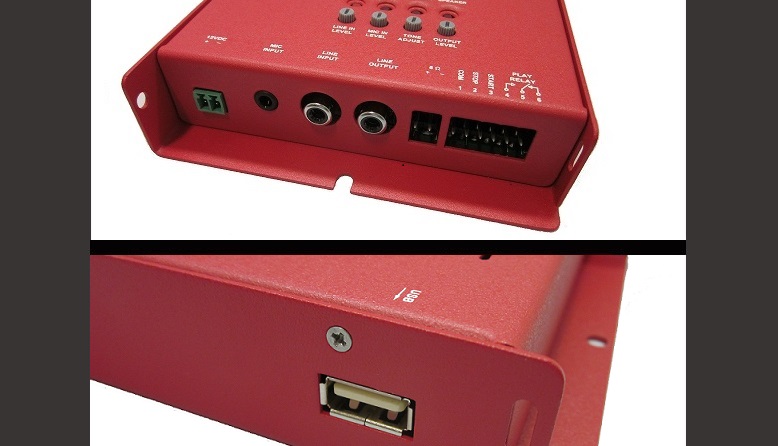
- Power (2 terminal pluggable connector, 2 pos Euro): pin 1 12 VDC at 1 A, or 15 VDC at 900 mA for the 10 W model; pin 2 ground. Current is 1 A with the power amplifier, 250 mA without. The power pack is sold separately (12 VDC, 1 A, or 15 VDC, 0.9 A).
- Mic input (1/8″ mini jack): mono microphone input for recording messages, up to 1.5 kΩ impedance, compatible with most consumer grade low impedance microphones.
- Line input (RCA): mono, unbalanced line level analog input for recording messages, 10 kΩ; compatible with the unbalanced outputs of most tape decks, CD players and DAT players.
- The mic input and the line input cannot be used at the same time; disconnect the line input for the microphone to work properly.
- Line output (RCA): mono, unbalanced line level analog output for playing messages, up to +3 dB into 600 Ω, a standard level for most applications; compatible with the unbalanced inputs of most audio equipment.
- 8 Ω speaker output (2 terminal pluggable connector, 2 pos Euro): bridged amplifier output + (pin 1) and − (pin 2), 2.5 W into 8 Ω (10 W on the Minimac2/10W). Use it when more drive is needed to reach a comfortable listening level; the built-in amplifier drives a speaker directly without additional hardware.
- Never reference either speaker output terminal to ground; this causes incorrect operation and may damage the unit. Connect the speaker directly across the two terminals.
- USB connector: USB type “A” connector for a USB memory key; audio files are copied between the key and the system’s internal SD card memory.
Remote I/O connector
A six terminal pluggable connector (6 pos Euro) gives remote access to start and stop control and to the play relay output, so a user supplied pushbutton, motion sensor or other control device can trigger playback by contact closure.
- Pin 1: common.
- Pin 2: stop; stops playback, if playing.
- Pin 3: start; plays the active message.
- Pin 4: play relay output, normally open.
- Pin 5: play relay output, common.
- Pin 6: play relay output, normally closed.
Controls
- Line in level knob: adjusts the line input level, continuous from −infinity to +0 dBm; set it while recording.
- Mic in level knob: adjusts the microphone input level, continuous from −infinity to +0 dBm; set it while recording.
- Tone adjust knob: sets bass and treble in 1 dB steps, from +10 dB bass and −10 dB treble (fully counter-clockwise) to −10 dB bass and +10 dB treble (fully clockwise); the centre position is 0 dB bass, 0 dB treble.
- Output level knob: sets the playback level of the line output and the speaker output together, from −infinity to +4 dB.
- Record pushbutton: enters record setup mode.
- Start/Stop pushbutton: plays the default message (holding it repeats the message), or stops playback or recording.
- Select pushbutton: selects the message position to record into or play from.
- Speaker pushbutton: turns the on-board monitor speaker on or off, to preview message playback.
Indicators
- Memory OK LED (green): on when the internal memory, or a USB memory key, holds valid audio messages; blinks when the memory is empty or no files are detected.
- Message LED (yellow): blinks the number of the selected message during select, play or record (blink – blink, pause indicates message #2); solid indicates sequential play mode. While choosing a position to record into, it blinks fast if a message is already stored there and slowly if the position is empty.
- Record LED (red): blinks in record setup mode and is solid while recording; also lit while messages are copied from the USB memory key to the SD card.
- Play LED (green): on while the system plays a message.
Recording and playback
Messages can be recorded locally into non-volatile memory with the integrated microphone input or the line input, or recorded in a studio and loaded over the high speed USB port. The non-volatile memory keeps the messages through a power outage.
- Recording: press Record (the Record LED blinks), press Select to choose the message position, press Start/Stop to begin recording (the Record LED turns solid), and press Start/Stop again to stop recording or to exit record mode.
- Erasing: enter record setup mode, select the message number to delete, then press and hold Start/Stop for about 2 seconds.
- Choosing the active message: press and hold Select for 2 seconds; the unit shows the current active message. Further presses step through all valid messages, #1 to #4, and then the “Play Sequential” mode (solid Message LED). Press Start/Stop to store the choice; it is kept through power outages.
- Standard mode: each trigger plays the same message position.
- Sequential mode: each trigger plays the next message until the last one, then starts again from the first.
- During playback the Play LED is lit and the Message LED blinks the number of the message playing.
Audio files and USB transfer
The internal 1 GB SD card holds over 16 hours of MP3 audio or over 1.5 hours of WAV audio. Messages may be any length, from a couple of seconds to several hours.
- Formats: WAV (44.1 kHz, 16 bit) or MP3 (44.1 kHz, 32–320 kbps, VBR). Local recordings are made as WAV, 44.1 kHz, mono.
- Files may be mono or stereo, but the unit plays only the left channel.
- Name files by number: 1.mp3 or 1.wav goes to message position 1, and so on up to 4.mp3 or 4.wav for position 4. Files beyond the fourth are played only in sequential mode.
- If the card holds two files with the same name but different suffixes, the MP3 file plays and the WAV file is ignored.
- USB key folder “Complete”: all files on the Minimac2 are deleted and replaced with the audio files in this folder.
- USB key folder “Delta”: audio files of the same name are replaced with the files in this folder.
- USB key folder “Upload”: when the key holds only an empty Upload folder, all audio files are copied from the Minimac2 into it.
- If the key has both a “Complete” and a “Delta” folder, no files are transferred and the LEDs show an error.
Documents
| Document | Content | Format |
|---|---|---|
| Spec sheet | Specifications | |
| Operation guide | User manual, version 1.2 | |
| Quikey: connectivity detail | Connectivity detail |
Images