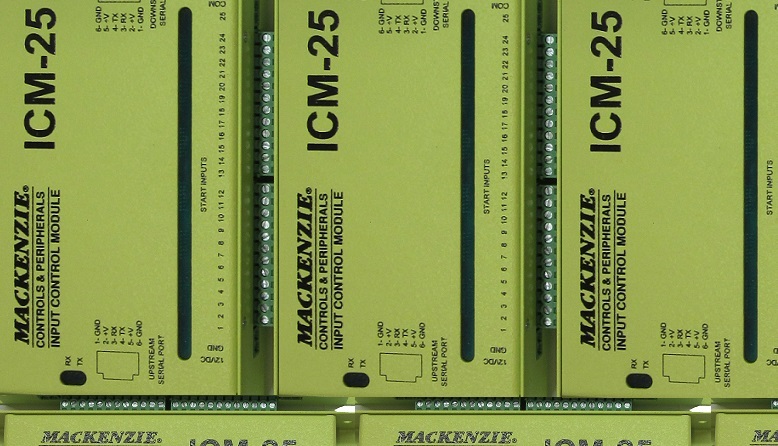
ICM-25 · Input control module with 25 inputs, RS232 output
Do you have more switches than inputs? The ICM gives you the expansion you need
The ICM is an input control module that extends the start contact capability of Mackenzie audio messaging systems. Each ICM unit offers 25 individual start contacts to initiate playback on the MacFi MPE, MacFi SE and M2 & M3. There is the possibility of up to two or more ICM units to be interfaced to allow additional messages depending on the model.
Overview
Key features
- 25 discrete message start contacts
- Multiple modules can be linked to provide up to 50 discrete message start contacts
- All inputs are optically coupled
- Status indicators show the activation of each input
- RS-232 communication to the host unit and other ICM units, with both upstream and downstream status indicators
- The configuration mode programmed on the host unit, including number of plays and repeats, is used by the ICM chain
- 12 VDC power, sourced from the host unit or supplied by an optional transformer
Specifications
| Control | |
|---|---|
| Start contacts | 25 discrete message start contacts |
| Expansion | Linked modules: up to 50 start contacts |
| Serial | Upstream and downstream RS-232, RJ12, 9600 baud, N, 8, 1 |
| Compatibility | MacFi-mpe 40, MacFi-se, M3.1, M3.1+1, M3.2 |
| Start inputs | 25 optically coupled start contacts, pluggable terminals; contact to common starts a message |
| Display | LEDs: power, each start input, upstream Rx/Tx, downstream Rx/Tx |
| Physical | |
| Power | 12 VDC, pluggable terminal; from the host or the optional ICM-PS supply (12 V, 1 A) |
| Mounting | Wall or equipment board (flat, side or horizontal), or table top |
| Models | |
| ICM-25-MPE | ICM-25 for the MacFi-mpe |
| ICM-25-SE | ICM-25 for the MacFi-se |
| ICM-25-M3 | ICM-25 for the M3 series |
User manual in brief
Installation
The ICM-25 input control module extends the start contact capability of Mackenzie digital message repeaters, which have a limited number of start contacts but larger message storage. Before installing it, make sure you have a compatible message repeater (MacFi-mpe 40, MacFi-se, M3.1, M3.1+1 or M3.2) and, if a separate power supply powers the ICM units, a non-switched 110 VAC outlet near the installation.
- Find a proper space on the equipment board or wall; the unit mounts in one of three positions, flat, side or horizontal.
- Position the unit on the board and mark the mounting hole locations.
- Secure the ICM-25 to the board or wall with the mounting screws provided.
- For table top mounting, stick the enclosed rubber feet on the bottom of the unit.
Power
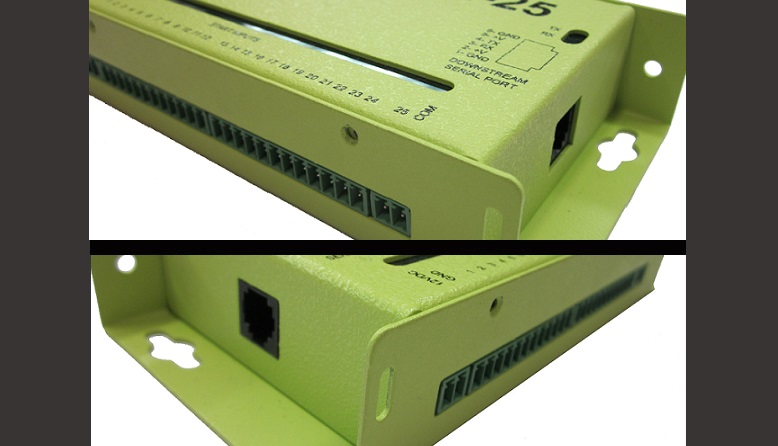
A 2 pin Euro terminal takes 12 VDC; one LED shows that the unit has power. Connect the power supply to the first ICM-25 in a chain; downstream units receive power through their upstream serial port.
- Shared power: the 12 VDC requirement is low, so power can often be shared with the host. Unplug the host’s power pack, run a low voltage 2 conductor cable (22 AWG minimum) from the 12VDC and GND positions of the ICM-25’s 2 pin Euro terminal to the matching positions of the power plug on the M3 or MacFi-mpe/se, then power the host on; the ICM-25 power LED lights.
- Dedicated power pack: plug the optional ICM-PS power pack (12 V at 1 A) into a 120 VAC outlet and its 2 pin Euro terminal into the ICM-25 position marked 12VDC and GND; the power LED lights.
Connection to the message repeater
The upstream serial port (RJ12) of the first ICM-25 in a chain connects to the serial input of the digital message repeater with the supplied control cable (RJ12 to 3 pin Euro). Upstream means towards the device you intend to control.
- Plug the RJ12 end of the control cable into the ICM-25’s upstream serial port.
- Plug the 3 pin Euro end into the serial port of the message repeater, whose pins are 1 receive, 2 transmit, 3 ground.
- Set the repeater’s communications port to the matching baud rate, 9600.
- If the ICM-25 is disconnected from the host during normal operation, allow at least 20 seconds for the ICM-25 and the host to resynchronize before any activation.
Linking ICM-25 units
Up to two ICM-25 units can be interfaced to a supported message repeater, giving access to an additional 50 messages. The downstream serial port (RJ12) of the first ICM-25 connects to further units for additional start inputs; downstream means away from the device you control.
- Plug one end of the supplied slave cable (RJ12 to RJ12) into the downstream serial port of the first ICM-25.
- Plug the other end into the upstream serial port of the next ICM-25.
Start inputs and message numbers
Two 12 pin and one 2 pin Euro terminals provide 25 optically coupled start inputs. Connecting an input to common (COM) sends a play command to the message repeater. The triggers act exactly like the repeater’s own start inputs, so all repeat, delay and mode settings programmed on the host apply. Which message plays depends on the host and on the unit’s position in the chain.
- MacFi-mpe/se: ICM unit #1 inputs 1–25 play messages 9–33; unit #2 plays messages 34–58.
- M3.1 and M3.1+1: unit #1 plays messages 11–35; unit #2 plays messages 36–60.
- M3.2: unit #1 plays messages 21–45; unit #2 plays messages 46–70.
Serial ports
Both ports are RS-232 on RJ12 connectors, 9600 baud, 8 data bits, no parity, 1 stop bit, with the same pin out.
- Pin 1: ground.
- Pin 2: 12 VDC.
- Pin 3: receive.
- Pin 4: transmit.
- Pin 5: 12 VDC.
- Pin 6: ground.
Indicators
- Power LED: on when the unit has power.
- Start input LEDs: one per input, lit for as long as its input is held to common. The leftmost LED is always on while the unit has power.
- Upstream LEDs (Tx, Rx): blink while the unit sends or receives data on the upstream serial port.
- Downstream LEDs (Tx, Rx): blink while the unit sends or receives data on the downstream serial port.
Documents
| Document | Content | Format |
|---|---|---|
| Spec sheet | Specifications | |
| Operation guide | User manual, version 1 | |
| Quikey: connectivity detail | Connectivity detail |
Images