DVTEL-3000 · Telephone load message-on-hold and storecasting system
One of Mackenzie’s finest products suitable for the standard telephone line.
The DVTEL-3000 is a powerful audio messaging system intended for Message-On-Hold and storecasting applications. The system is designed to be operated remotely by the messaging provider. The DVTEL allows for two independent channels with the potential for their own background music, messages, and schedule. A single system is able to support two message-on-hold ports, message-on-hold and storecasting channels or two different storecasting zones.
Overview
Key features
- Digital transfer: message material is sent with Z-Modem, an error-correcting digital protocol that ensures and confirms messages are received correctly, at various audio quality levels independent of phone line conditions
- MPEG compression: audio stored as MPEG I Layer III (MP3), with user-scalable bandwidth from 7 kHz to 20 kHz for message-on-hold or storecasting; 10:1 compression minimizes transfer time
- Built-in fax switch: a proprietary fax switching technique that does not rely on ring types, voltage or DTMF
- Contact management: C-MAC software controls groups, schedules and individual downloads in the background
- Flexibility: a wide array of channel, memory and control possibilities
- 16 MB / 64 minutes of flash memory
- Internal 33.6k modem
- Built-in fax sharing
- Background music input
- Level controls
- Monitor speaker
- Line level and amplified audio outputs
- DVTEL-3100MT and 3200MT models offer additional functions
- C-MAC software: Windows 95/98/NT compatible
- C-MAC software: customer maintenance
- C-MAC software: download scheduling
- C-MAC software: remote access to control all aspects of the remote hardware
- C-MAC software: playlist and daypart capability
- C-MAC software: multiple modems or modem rack
- C-MAC software: production and composition compatible with standard .WAV files
- C-MAC software: reporting
Specifications
| Audio | |
|---|---|
| File formats | MP3 |
| Bandwidth | 20 kHz |
| Outputs | Line level and amplified |
| Background music | Background music input |
| Monitor | Integrated speaker |
| Quality | 85 dB dynamic range; 20 Hz–20 kHz at 128 kbps; THD < 0.01% at 1 kHz; 48 kHz, 16 bit |
| Audio coding | Up to 10:1 compression; mono: 7 kHz at 32 kbps, 15 kHz at 64 kbps, 20 kHz at 128 kbps |
| Output | Line: RCA, transformer isolated, 600 Ω; amplified: 4 W into 8 Ω; gain adjustable ±3 dB |
| Audio inputs | BGM: mono RCA, transformer isolated, 600 Ω, adjustable level |
| Messages and storage | |
| Memory | 16 MB (64 minutes) |
| Channels | 2 independent channels, each with its own music, messages and schedule |
| Loading | Telephone line: internal 33.6k modem, operated remotely |
| Transfer | Z-Modem error-correcting digital transfer from the provider’s C-MAC software |
| Control | |
| Manual controls | Level controls |
| Fax | Built-in fax sensor |
| Indicators | Power, TX, RX, RNG, DTR, DCD, CH1 PLY, CH2 PLY LEDs |
| Physical | |
| Dimensions | 10″ W × 1.5″ H × 8″ D |
| Power | 12 VDC, 1 A, 2.5 mm barrel |
| Mounting | Table top or wall; 18 gauge cold rolled steel chassis |
| Rating | FCC Part 15, Class A; UL/CSA approved external power pack |
| Warranty | 3 years |
| Interfaces | |
| Interface | Two RJ12 jacks (Line, Fax), line share |
| Models | |
| DVTEL-3164MT | One channel, 64 minutes of fixed flash memory, no LCD, music thru |
| DVTEL-3264MT | Two channels, 64 minutes of fixed flash memory, no LCD, music thru |
| DVTEL-3100MT | One channel, LCD and pushbutton configuration control, music thru |
| DVTEL-3200MT | Two channels of independent audio messaging, LCD and pushbutton configuration control, music thru |
User manual in brief
Overview
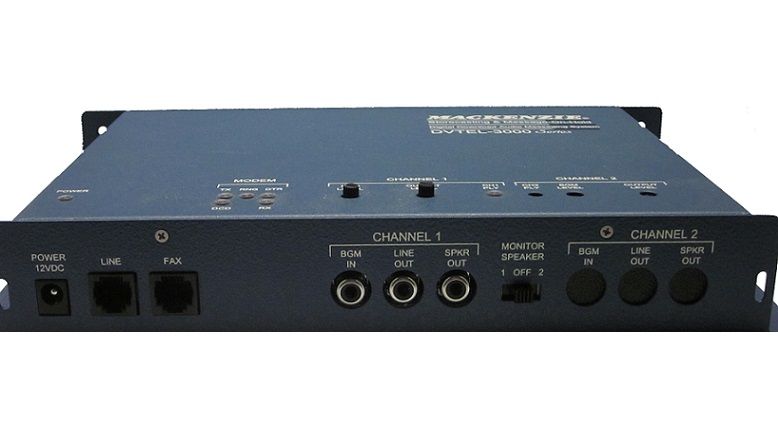
The DVTEL is a powerful audio messaging system for message-on-hold (M-O-H) and storecasting. It is operated remotely by the messaging provider; once installed, it needs no further attention from the user. All audio and configuration settings are downloaded over the telephone line, which eliminates tape distribution.
On the provider’s side, the Customer Maintenance and Communication (C-MAC) software lets a standard computer encode audio files and transfer them to DVTEL units by modem, so one production location can deliver material to many remote sites.
The two-channel DVTEL-3200 has independent channels of messages and music, each with its own background music, messages and schedule. One unit can serve two message-on-hold ports, a message-on-hold and a storecasting channel, or two storecasting zones.
- Digital transfer: material is sent with Z-Modem, an error-correcting digital protocol that confirms messages are received correctly, at the chosen audio quality whatever the phone line conditions.
- MPEG compression: from voice to CD quality, compressing data up to 10:1 to keep transfer time short.
- Built-in fax switch: a proprietary fax switching technique removes the need for a dedicated phone line.
- Background music input: an external music feed is mixed with the messages.
- Flash memory: messages survive power loss without battery backup, and playback resumes automatically when power returns.
- Monitor speaker and level controls: settings can be checked in real time during installation.
- Models: DVTEL-3164MT (one channel, 64 minutes of fixed flash memory, no LCD, music thru), DVTEL-3264MT (two channels, 64 minutes, no LCD, music thru), DVTEL-3100MT (one channel, LCD and pushbutton configuration control, music thru) and DVTEL-3200MT (two independent channels, LCD and pushbutton configuration control, music thru).
Choosing the installation procedure
There are three installation procedures, depending on the phone line used; Procedure A (fax share line) is recommended. Whichever is used, the DVTEL must always be connected directly to the telephone company input, ahead of any other device on that line.
- Procedure A, fax share: the installation line is shared with a fax machine, which must be set to answer on or after the second ring.
- Procedure B, dedicated line: the line is used only by the DVTEL.
- Procedure C, voice line: the line is also used as a normal voice line.
Installation steps
- Make sure power is disconnected from the DVTEL.
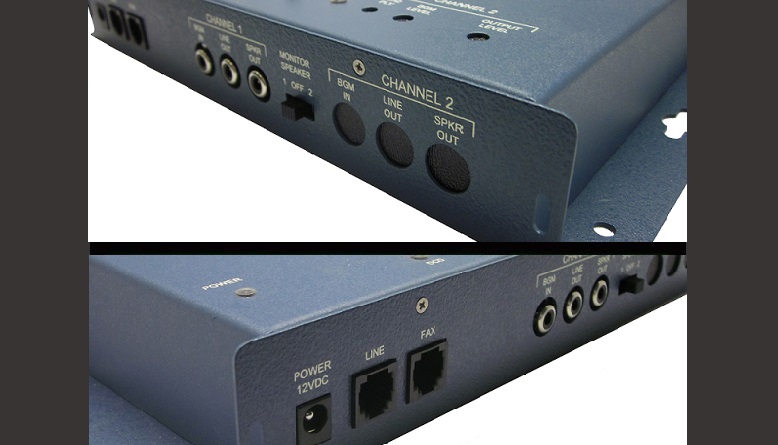
- Connect a modular telephone cable from the phone company box for the installation number to the Line jack on the back of the unit; the end may need adapting to mate with the incoming line. In Procedures A and C the DVTEL must come before the fax machine or any other telephone equipment.
- Procedure A: connect the Fax jack to the fax machine with a second modular cable. Procedure C: connect the Fax jack to the other telephone equipment (KSU, PBX, telephone, etc.).
- Choose the output that matches the M-O-H input of the telephone system, Line Out (600 Ω) or Speaker Out (8 Ω), and connect it with an RCA cable; the cable may need adapting to the phone system’s input.
- If used, connect the line level (600 Ω) background music source to BGM In.
- Plug the included 12 VDC power supply into a normal 110 VAC wall outlet and into the Power jack.
- A solid green Power LED shows the unit is operating properly.
- Procedure A: set the fax machine to answer after at least two rings.
Activation, testing and setting levels
Check the Power LED, just above the power connector on the top of the unit: steady means the system initialized correctly, flashing means it did not (call technical support). Then contact the provider for activation and message download, and follow it on the indicators: DTR on (provider is logging on), DCD on (provider has logged on), TX and RX flashing (configuration and messages are downloading), RNG flashing (a call is coming in). When TX, DTR, RX and DCD are all off, the download is complete.
- Select Monitor Speaker switch 1 to hear channel 1 on the internal speaker, and switch 2 for channel 2; the LED above each channel indication is on while its messages play.
- Call into the telephone system, ask to be placed on hold and, while listening, adjust the message volume with the Output Volume potentiometer on top of the unit, for each channel.
- If the music input is used, adjust it with the BGM Level potentiometer, for each channel.
- When the levels are correct, hang up and switch the internal speaker off; installation is complete.
- The Output Volume and music input potentiometers adjust ±3 dB around the value set at activation; for a larger change, the provider downloads a new value.
- Output Volume is the master for both messages and music; set it before the music input volume.
Connections and specifications
- Line and Fax jacks: two RJ12 modular jacks to the internal 33.6k modem, with line sharing.
- Line Out: RCA, transformer isolated, 600 Ω, mono.
- Speaker Out: amplified, 4 W into 8 Ω.
- BGM In: mono RCA, transformer isolated, 600 Ω, with adjustable level.
- Power: 12 VDC, 1 A, 2.5 mm barrel connector.
- Audio: 85 dB dynamic range, 20 Hz to 20 kHz frequency response at 128 kbps, THD below 0.01% at 1 kHz; audio stored in 16 MB of flash memory.
- Compression data rates (mono): 7 kHz bandwidth at 32 kbps, 15 kHz at 64 kbps, 20 kHz at 128 kbps.
- Audio output features: mixing, volume, fade, tone, interval, and preceding / proceeding message.
- Mechanical: table-top or wall mount, 10″ W × 8″ D × 1.5″ H, 18 gauge cold rolled steel chassis.
- Approvals: FCC Part 15, Class A; UL/CSA approval on the external power pack.
LED indicators
- Power on: the system initialized correctly.
- Power flashing: the system did not initialize correctly; call technical support.
- TX (transmit) and RX (receive) flashing: the system is receiving a download.
- RNG flashing: the line is ringing.
- DTR on: the host is logging on.
- DCD on: the host is connected.
- CH1 PLY and CH2 PLY: on while a message is playing on that channel, off when it is not.
Troubleshooting
- Power LED flashing → the system did not initialize properly; contact technical support.
- Output level too low → check that the right output, Line Out (600 Ω) or Speaker Out (8 Ω), is in use; raise the Output Level potentiometer; ask the provider to download a higher output volume setting.
- The fax or telephone line attached to the DVTEL does not work → the unit may be receiving a download (check the TX, DTR, RX and DCD indicators); check the connections from the Fax jack.
Documents
| Document | Content | Format |
|---|---|---|
| Spec sheet | Specifications | |
| Operation guide | User manual, version 1.1 | |
| Quikey: connectivity detail | Connectivity detail |
Images
Related models: Message on hold and storecasting
| DVSD-3000 | SD card / USB load message-on-hold system | |
|---|---|---|
| DVSD-3000MTS/LR | USB autoload storecaster with music-thru and local record | |
| DVTEL-3000 | Telephone load message-on-hold and storecasting system | This page |
| DVNET-3000 | IP network load message-on-hold system |