DVSD-3000MTS/LR · USB autoload storecaster with music-thru and local record
A versatile Storecasting and Message-On-Hold System With Local record, background music (BGM), selectable message, and much more!
The DVSD-3000MTS/LR is a highly reliable audio playback system designed for Storecasting and Message-On-Hold applications. This system offers 20 independent message locations, each with an individual enable switch. It seamlessly combines your marketing messages with an external music source, enhancing your clients shopping or on-hold experience.
Overview
Key features
- Removable SD card, non-volatile memory storage
- USB key can play directly, or transfer data to the SD card
- Supports WAV and MP3 files
- High speed USB 2.0 host port
- Up to 20 message capacity
- Adjustable tone control and monitor speaker
- Frequency response up to 15 kHz
- Local recording capability with optional handset
- BGM input with volume and mix control
- Individual message skip feature
- Built-in delay timer, 00–99 seconds or minutes
- Audio output format switching: music only, music & message, message only
Applications
- Message-On-Hold: combine marketing messages with music to keep clients interested and informed about your company or products while they are on hold
- Storecasting: seamlessly integrate in-store advertising messages with your background music
Specifications
| Audio | |
|---|---|
| File formats | WAV, MP3 |
| Bandwidth | 15 kHz |
| Output | Adjustable dual output, 8 Ω / 600 Ω |
| Background music | External background music source |
| Quality | Excellent signal-to-noise ratio and dynamic range |
| Monitor | Integrated speaker |
| Signal to noise | 80 dB |
| Audio inputs | BGM input: RCA, mono, 10 kΩ |
| Tone control | Adjustable |
| Messages and storage | |
| Messages | 20 independent messages, each with its own enable switch |
| Recording | RJ22 jack for a local record handset |
| Loading | High-speed USB 2.0 host port (autoload) |
| Memory | 1 GB SD card standard: about 69 hours of MP3 at 32 kbps or 17 hours at 128 kbps |
| Delay between messages | Music interval 00–99 seconds or minutes (rotary switches) |
| Control | |
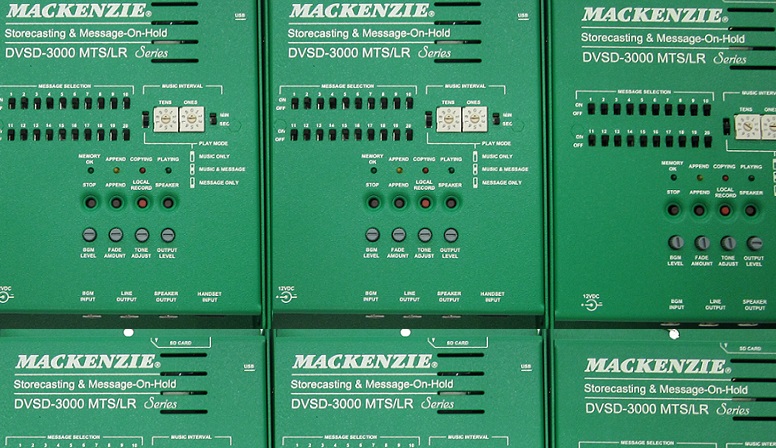
| Manual controls | Background music level and fade, output volume, append mode, speaker enable |
| Modes | Music only, music & message, message only |
| Indicators | Memory OK, Copying, Playing and Append LEDs |
| Physical | |
| Power | 12 VDC, 1 A; power pack included |
| Dimensions | 6.4″ W × 4.6″ D × 1.1″ H |
| Mounting | Painted steel chassis; 3-position mounting (flat, side or horizontal) on wall or board, or table top |
| Warranty | 3 years |
User manual in brief
Overview
The DVSD-3000 MTS/LR is a versatile Message-On-Hold and storecasting system that combines your marketing messages with an external background music (BGM) source, for callers on hold or customers in your retail location. It holds up to 20 individual messages in WAV or MP3 files, loaded from an SD card or a USB memory key, or recorded on site with the optional local record handset; files on these media are not lost in a power outage.
Each of the 20 message locations has its own enable switch, and an on-board music interval timer sets how often messages play. Line and speaker outputs with level control and tone adjustment let the sound be optimized for almost any telephone or public address system.
- Memory: ships with a 1 GB SD card as standard, about 69 hours of MP3 audio at 32 kbps (voice quality) or 17 hours at 128 kbps (high quality). Use standard SD cards only: high capacity (SD-HC) cards may not be recognized.
- In the box: DVSD-3000 MTS/LR, power pack, audio cable, mounting hardware and user’s manual.
- Options: MUSB-256 (256 MB USB memory key) and LR-HSET (local record handset and cable).
Installation
Before installing, make sure you have a message-on-hold or music-on-hold input on the telephone system, or a line level input on the public address system, and a non-switched 120 VAC outlet near the unit.
- Mounting: the unit mounts on the telephone equipment board or a wall in one of three positions: flat, side or horizontal. Mark the mounting holes and fasten it with the screws provided; for table-top use, stick the enclosed rubber feet on the bottom.
- Power: plug the power pack into an outlet that is not controlled by a switch, then into the jack marked 12VDC. There is no power switch; the system is active as soon as power is connected.
- Telephone system: connect the supplied RCA to RCA cable from LINE OUT to the telephone system’s line level (M-O-H) input.
- PA system: connect LINE OUT to the PA amplifier’s line level input.
- In both cases start with LINE OUT (low, +3 dB into 600 Ω) and set the level with the output level knob; if it cannot reach a high enough level, use SPEAKER OUT (high, 2.5 W into 8 Ω).
- Background music: connect the BGM INPUT to the output of the music source.
Connections
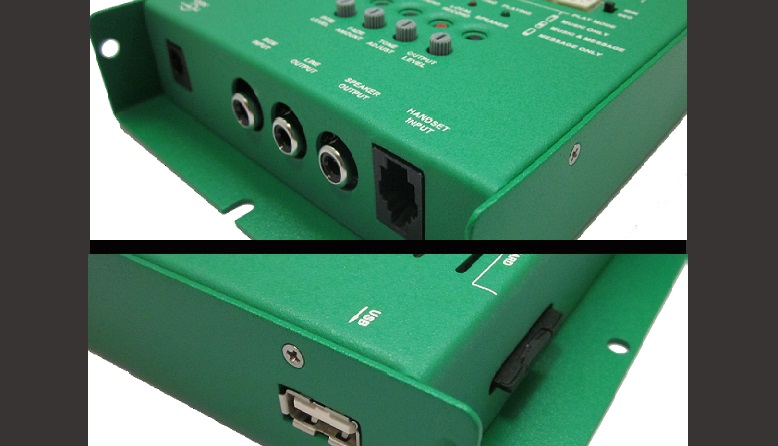
- 12VDC (2.5 mm barrel): powered by the supplied 12 VDC, 1 A adapter; use only the adapter supplied by the manufacturer.
- LINE OUTPUT (RCA, mono): 600 Ω line output, up to +3 dB, the standard level for most applications. Connect it to the telephone or PA system first.
- SPEAKER OUT (RCA, mono): amplified output, 2.5 W into 8 Ω, for an on-hold circuit or PA system that needs more level than the line output can drive.
- BGM INPUT (RCA, mono): 10 kΩ audio input for the external background music source.
- HANDSET INPUT (RJ22): local record input for the optional LR-HSET handset.
- USB (type A): for a standard USB memory key, to play audio files from it or transfer them to the SD card.
- SD card connector (top side): holds the SD card memory. The card can be removed, audio files placed on it directly, and the card put back.
Loading messages from a USB key or SD card
The unit may arrive without messages on its SD card. Load messages directly onto the SD card with a memory card writer, or insert a properly prepared USB memory key with its label facing the top of the unit.
When a USB key is inserted, the system copies its audio files to the SD card (with no SD card installed, it plays straight from the key). The red Copying LED is lit during the transfer; do not remove the key while it is lit, or the memory could be corrupted. When the transfer ends, the enabled messages start playing. The Append button selects one of two download modes:
- Mode 1, Replace All (Append LED off): all messages in memory are erased as soon as the key is inserted, and the files on the key are placed in locations 1 onwards. Use it when every message needs updating.
- Mode 2, Replace and Append (Append LED on): press Append until the LED lights, switch ON the message selection switches of the messages to overwrite and OFF those to keep, then insert the key. The first file replaces the first enabled location, the second file the second, and so on; enabled messages are erased as soon as the key is inserted. Extra files are appended to empty locations until 20 messages are recorded or the key runs out.
- Example: with ten messages recorded, to replace messages 3 and 7 and add three new ones, activate Append, enable only switches 3 and 7, and insert a key with five files: they go to locations 3, 7, 11, 12 and 13.
- To only append messages, activate Replace and Append and switch all message selection switches off; the files on the key go into the empty locations.
- The Append mode setting is not kept when power is removed.
Recording with the local record handset
With the optional LR-HSET handset, custom messages can be recorded directly into any of the 20 message locations and updated at any time, for last-minute changes or frequently updated material.
- Plug the LR-HSET into the Local Record input.
- Press the red Local Record pushbutton; the Copying LED blinks.
- Toggle the selection switch of the desired message location twice: if the location is disabled, up then down; if it is enabled, down then up. Locations may be recorded whether enabled or disabled.
- When the Copying LED is lit steadily, record the message into the handset.
- Press Stop to end the recording and save it; a preview of the message plays automatically. Holding Stop for two seconds while recording deletes the message just recorded.
- Leave the switch up (enabled) if the message is to play.
Preparing the audio files
- Format the memory as FAT or FAT16; other formats may not be recognized.
- Audio files: WAV (44.1 kHz, 16 bit) or MP3 (44.1 kHz, 32 to 320 kbps, VBR), all in the root folder of the card or key.
- Files may be mono or stereo, but only the left channel is played.
- Use one long message or several shorter ones; messages need not be the same length.
- Set the audio to a nominal level of −4 dBm; keep the dynamic range of the production low so it can be recorded at the highest level without exceeding 0 dBm.
- Files play in alphanumeric order, so name them to show their content and order, for example 1_brownies.mp3, 2_apples.mp3, 3_top sirloin.mp3.
- Only the first 20 messages in that order are played; if two files have the same name, the MP3 file plays before the WAV file.
Playback, play modes and music interval
Once messages are in memory, the DVSD-3000 MTS/LR plays them automatically, with no control or user input. All enabled messages play in sequence, with the programmed music interval between them; an enabled location with no message is skipped.
- Message selection switches 1–20: up (ON) enables a message, down (OFF) skips it. Changes are recognized during normal operation.
- Play mode switch, up, Music only: no messages are played; the BGM is routed straight to the output.
- Play mode switch, middle, Music & Message (default, normal operation): while a message plays, the BGM is mixed with it; between messages the BGM goes straight to the output.
- Play mode switch, down, Message only: messages play according to the music interval, the BGM is muted, and the output is silent between messages.
- Music interval: two rotary switches set 00 to 99 (left: tens, right: ones), and a MIN/SEC slide switch sets the unit. For example 2, 5 and SEC give 25 seconds between messages. The switches are read during operation, so the setting can be changed while messages play.
Controls and indicators
- Output level knob: sets the level of both the Speaker Output and the Line Output; clockwise raises it. It does not affect the monitor speaker.
- Tone adjust knob: clockwise lowers the bass and adds treble, counter-clockwise lowers the treble and adds bass; at the center no bass or treble is added. Use it to tailor the response to the telephone or PA system.
- BGM level knob: sets the level of the incoming background music; clockwise raises it. If the BGM sounds distorted, the input level is too high: turn it counter-clockwise.
- Fade amount knob: sets how much the BGM is ducked while a message plays. Fully counter-clockwise gives no fade; fully clockwise fades the BGM by about 30 dB.
- Stop pushbutton: stops a handset recording and saves it; held for two seconds, deletes the message just recorded.
- Append pushbutton: toggles between Replace All and Replace and Append.
- Local Record pushbutton (red): starts a local recording.
- Speaker pushbutton: turns the front monitor speaker on or off; its volume is preset and cannot be adjusted in the field. Do not raise the output level to hear the monitor better, as that changes the level sent to the telephone or PA system.
- Memory OK LED (green): solid when an SD card or USB key with at least one valid message is detected; blinks quickly twice every half second when the memory has no valid audio; blinks twice per second while no memory is detected.
- Copying LED (red): lit while files are transferred from the USB key to the SD card; blinks twice per second after a transfer error until power is cycled or the key is removed and reinserted.
- Playing LED (green): solid in play mode, both while a message plays and during the interval between messages.
- Append LED: off in Replace All mode, on in Replace and Append mode.
Power failure and troubleshooting
The SD card and USB key need neither power nor battery backup to keep their contents, so brownouts and power losses do no harm; when power returns, the system resumes what it was doing.
- No LEDs lit → check that the power adapter is in a non-switched outlet and fully plugged into the unit.
- Memory key or card will not insert → align it properly and check the slot for foreign objects.
- Nothing plays after a memory is inserted, or the USB key will not play → check that the memory is seated and that its root folder holds at least one MP3 or WAV file; try copying the files to another key.
- Files will not transfer from the USB key → check that an SD card is installed and that the key’s root folder holds at least one MP3 or WAV file.
- No sound from the output → check the RCA cable at both ends, turn the output level clockwise, or use the 8 Ω output instead of the line output.
- No sound from the monitor speaker → if the Playing LED is off, there are no messages; press the Speaker button to switch the speaker on.
Documents
| Document | Content | Format |
|---|---|---|
| Spec sheet | Specifications | |
| Operation guide | User manual, version 1.1 | |
| Quikey: connectivity detail | Connectivity detail |
Images
Related models: Message on hold and storecasting
| DVSD-3000 | SD card / USB load message-on-hold system | |
|---|---|---|
| DVSD-3000MTS/LR | USB autoload storecaster with music-thru and local record | This page |
| DVTEL-3000 | Telephone load message-on-hold and storecasting system | |
| DVNET-3000 | IP network load message-on-hold system |